

Navigation & UI enhancements
- Fix Ai model doesn’t change in menu
- Make keys in API keys capital
- Fix border colour in chatwidget settings app
Bug fixes and reliability
- Fix when out of office times where invalid you recieve error code
- Fix adjus export so it shows name of human Agent
Agent improvements
- Fix XML feed upload issue where some feeds could not be uploaded
- Fix ction doesn’t get called in widget but in tester
- Fix where Ai agent does not always fill in the default field i.e name, email..
Navigation & UI enhancements
- The Agent Settings side menu has been updated with a new, improved design for clearer navigation and usability.
- Fixed an issue where switching agents showed the name of the previously selected agent.
- Fixed an issue where only Tags, API keys, and Notifications were visible in the main menu.
New features
- A new onboarding flow has been added that automatically sets up an Agent after registration.
Performance & infrastructure
- The Webcrawler has been optimized with improved crawling capabilities.
- Automatic re-crawling has been introduced via a scheduled cronjob.
- Additional page metadata is now collected during crawls.
- An issue causing orphaned URLs not to be deleted correctly has been fixed.
Agent improvements
- When mass deleting crawlers, a loading spinner is now shown on the delete button before closing the popup.
New features
- Christmas mode has been enabled across the platform.
Agent improvements
- New Agents now open directly in the Playground for faster testing
- Outdated nano models have been removed and GPT-5 mini is now the default model
- Clicking “Connect channel” now scrolls directly to the relevant Agent settings section
Performance & infrastructure
- Speed has been improved by increasing chunk size without impacting Agent quality.
Navigation & UI enhancements
- “AI Agent Settings” has been renamed to Settings for clearer navigation
- Disabled channels no longer show hover effects and now display a blocked cursor when trying to click the checkbox
- The Save button in Instructions is now correctly aligned to the bottom right
- Unnecessary whitespace has been removed when instruction categories are empty
- Instructions, XML feeds and Human Handover now share consistent borders and hover styling
- The top bar settings icon now correctly reflects the active section
- The Agent limit indicator stays neutral until the limit is reached
- Domain Knowledge styling has been aligned with the rest of the Agent configuration (only for legacy agents)
- Human Handover spacing, widths and borders are now consistent with other Agent settings
- Vertical spacing in Human Handover has been reduced for a cleaner layout
- Missing card shadows in Agent templates have been restored
- Playground inputs now use clean outlines instead of drop shadows
- Spacing in the Playground input bar has been standardized
Bug fixes and reliability
- The Human Handover page no longer gets stuck or keeps loading on first visit
- Agent settings now remember the last active section after a page refresh.
New features
- Button added to minimize the chat widget, making it easier for end-users to close it.
- Added GPT-5.1 to the model selector.
- We changed the way agents work significantly, for new agents only, including:
- New Agent settings with guardrails and placeholders for both personality and guardrails
- Safety filters removed for the new Agents
- Domain knowledge replaced by Agent settings for new Agents
- Instructions now play a much stronger role in generating responses
- Channel, name, model, banner, and profile image can all be configured in the new settings
- All other functionality of the legacy Agents remains unchanged — they still use domain knowledge and safety filters
Agent improvements
- Improved context building in system prompts based on the used sources.
- Solved an issue with agent timeouts.
- Improved the agent response speed significantly
Performance & infrastructure
- Improved the loading speed in Agents overview for very large number of Agents
Navigation & UI enhancements
- Updated the links in the personal menu dropdown.
- Removed outdated Help Center links and replaced them with links to the new Help Center.
- Added loading state to the “Export statistics” button for clarity during generation.
- Minor copy and visual improvements in the XML feed and data injection screens.
- XML feed now fetches bigger xml feeds correctly.
- Fixed web crawler behaviour where deleting URLs through filters caused the filters to disappear.
- Fixed an issue where newly added XML feeds incorrectly showed “Active” before switching to “Syncing.”
- All Agents have a new Agent settings panel
Bug fixes and reliability
- Fixed an issue where webhook events were sent twice.
- Fixed an issue where previously stored actions in Agent memory could cause crashes when triggered again, resulting in no answer from the Agent.
- Agents no longer use sources outside the “Selected URL” in AI Search.
- Resolved a problem where the XML feed continued syncing indefinitely.
- Fixed missing average pickup time and handling time in Analytics.
- Resolved an issue with the Zapier authentication URL.
- Web crawler no longer deletes more URLs than selected.
Automatic widget event tracking
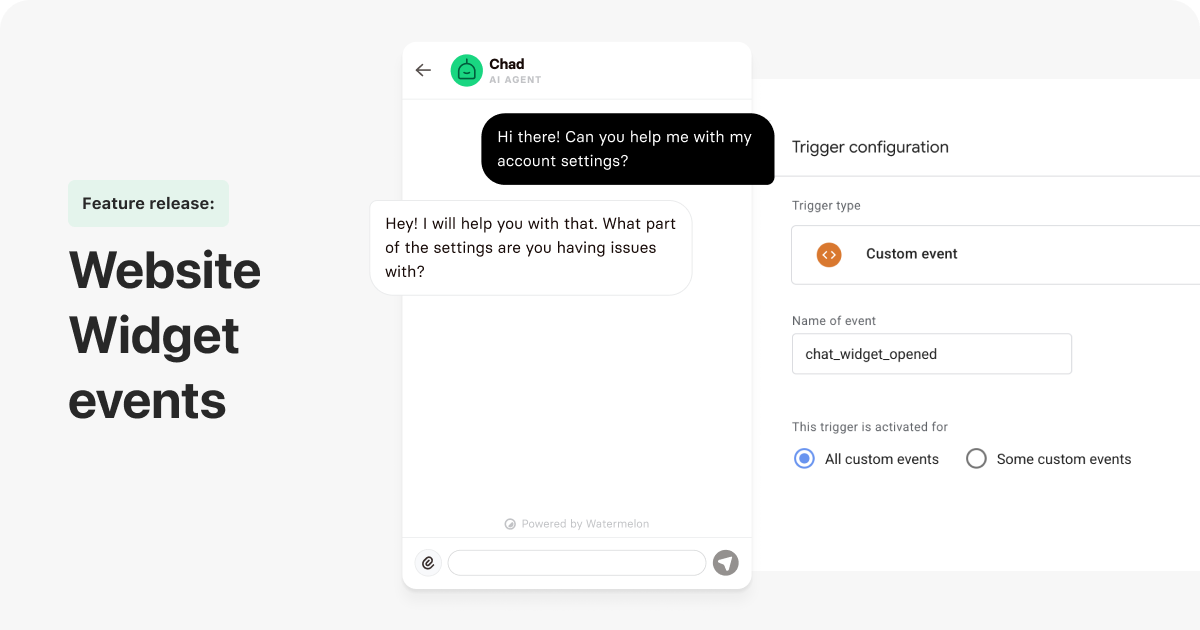
The widget now sends events such as openings, messages, and link clicks directly to your website’s data layer. These events can be used in Google Tag Manager, GA4, Meta Ads, LinkedIn Ads, and other tools to monitor engagement or trigger conversions.👉 View all available events
Recognize logged-in users
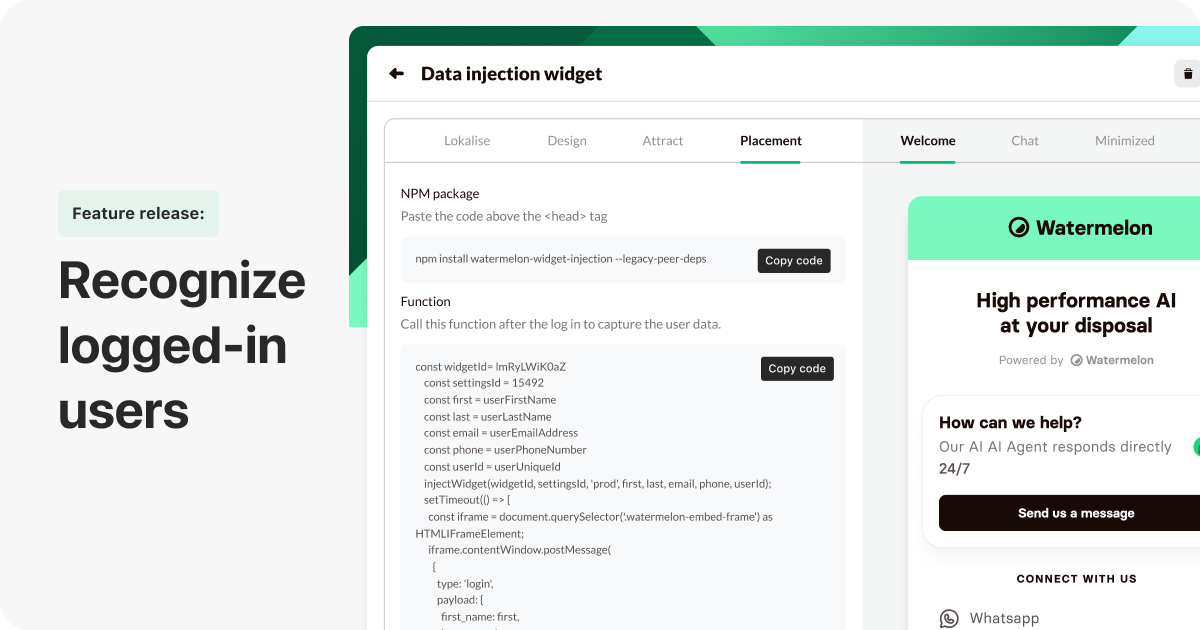
The widget now recognizes logged-in users, syncing conversations across devices and sending user details directly to the Agent for more personalized replies.👉 How to enable recognition
Agent improvements
- Fixed spacing in the Agent settings popup.
- “AI Search” is now available on the correct plans and no longer logs users out when toggled.
- Instructions are no longer incorrectly locked on the Premium plan.
Performance & infrastructure
- General container adjustments for improved stability.
Navigation & UI enhancements
- Developer docs platform URL updated.
- Wrong spacing fixed in Agent settings popup.
- Feature request and documentation pages improved
- Improved routing for documentation pages.
- Beta label added to the XML feed for clearer visibility.
Visual improvements
- Spacing and visual alignment improvements in widget and Agent UI components.
Bug fixes and reliability
- Widget set to Hide on website no longer flashes briefly before hiding.
- XML Feed:
- Fixed a 400 error when checking XML sitemaps.
- XML feed no longer fails on Basic and higher plans.
- Fixed missing variables in ChatPromptTemplate.
- Fixed issue where the eye-catcher remained visible even when the widget was hidden.
XML feed connection
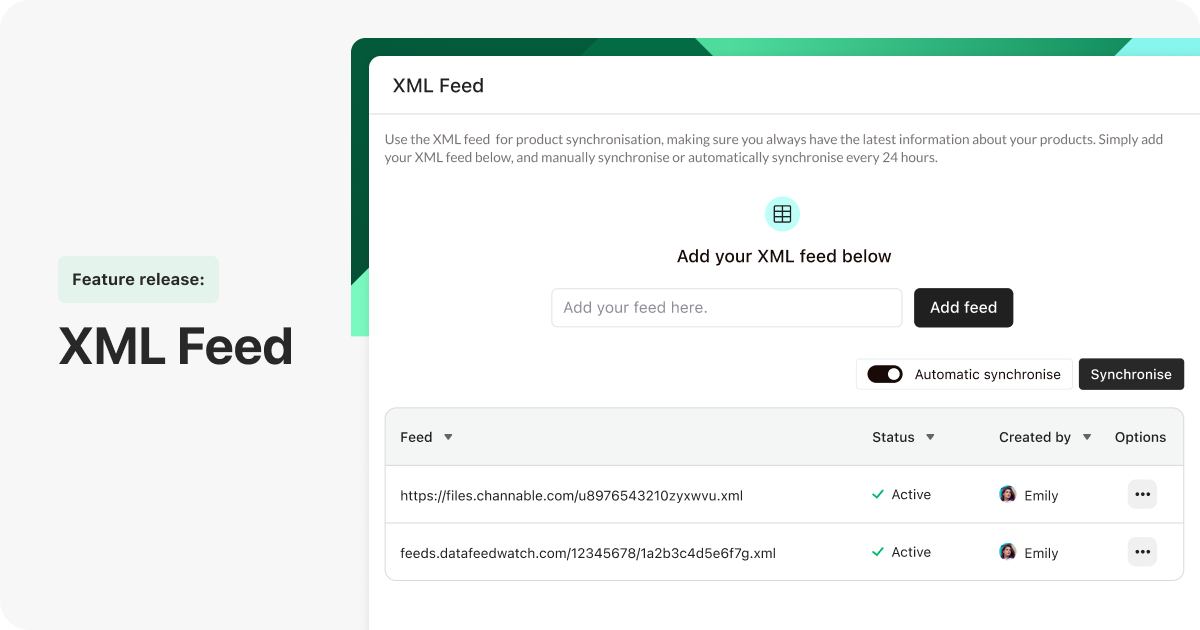
Connect your webshop’s XML product feed (e.g., Channable, Google Shopping) so your Agent always uses the most up-to-date product information. Available on all plans, with automatic daily syncing on Business and Enterprise.👉 How to connect the XML feed
Agent improvements
- Resolved a scaling issue that caused the Agent to get stuck with a thinking state (503 error).
- Fixed an issue where the chat widget didn’t switch models correctly.
Performance & infrastructure
- Improved server stability to avoid Agent timeout issues under high load.
- Feature flags introduced to allow smoother rollout of new functionality.
Navigation & UI enhancements
- Updated profile menu design.
- Updated link colors to bold black for better readability.
- Text styling improvements in the redesigned home screen.
- Buttons updated to the newer Radix style across key components.
- Menu redesign: updated layout, trial badge added, and improved personal menu.
- Private Apps renamed back to API for clarity.
- Homescreen redesign (V3) now live.
- Company details added to the Settings menu for easier access.
- On Home, a clear “Create your first Agent” button is shown when none exist.
Visual improvements
- Updated styling across the home screen and menu.
- Fixed alignment and display issues in Website Activity views.
- Improved consistency in text colors and design tokens.
Analytics changes
- Statistics end date now handled correctly (inclusive).
API improvements
- Webhooks in the messaging API now behave correctly.
Bug fixes and reliability
- Bulk-delete in the Web Crawler no longer results in errors when filters are applied.
- “See all” in Website Activity now returns you correctly without hiding default fields.
- Inactive URLs in Website Activity now show their indicator dots again.
- Excluded URLs and missing document bugs in Agents are fixed.
- Incorrect tag counts in Insights have been corrected.
- Missing or broken webhook logic in the messaging API is now fixed.
- End date in Statistics is now inclusive, giving you accurate reporting.
- Fixed a top-bar link issue and an error in Pulse when an iframe was missing.
- Basic and Premium plans now correctly show a disabled auto-sync button.
- XML Feed buttons now use the correct Radix styling.
Agent improvements
- gpt-5-chat-latest label removed from model selection for clarity.
Performance & infrastructure
- Added signup.watermelon.ai to allowed backend origins.
Navigation & UI enhancements
- Improved handling of widget-id and settings-id for 404 pages.
- Additional UI stability improvements from home-screen adjustments.
- Home-screen adjustments.
- Mollie integration hidden from the Apps section.
Visual improvements
- Minor adjustments from home-screen refinements.
Bug fixes and reliability
- Security fix: IDOR vulnerability that allowed elevation to administrator privileges.
- Domain knowledge / JSON no longer misinterprets curly braces as variables inside Actions.
- Fixed custom channel issue where messages failed to send.
- Crawler limit now resets correctly.
- Tool confirmation is no longer required for non-writing operations.
- Fixed error ‘dict’ object has no attribute ‘first_name’ in generate function.
- SEO issues fixed for the demo-request component.
- Desktop App no longer goes blank or crashes when left open for long periods.
- Updated widget-id and settings-id handling for 404 widget.
Agent improvements
- The Agent no longer gets stuck on “is thinking…”.
- The stream delay issue is resolved — the Agent now shows its response immediately after the thinking phase.
Performance & infrastructure
- Response speed in conversations has been improved, making replies feel faster and smoother.
Navigation & UI enhancements
- Statistics now show percentage values for office and out-of-office hours.
- All chat widget template options are selected by default for a more consistent setup.
- Crawler loading bar is restored, giving clear progress feedback.
Visual improvements
- Conversation formatting stays aligned and clean when navigating previous messages.
- Default fields table now presents the correct label.
Bug fixes and reliability
- Resetting crawl limits now works correctly.
- Crawler links now open in a new tab again.
- Desktop app no longer crashes or turns blank when left open for a long time.
- Statistics dropdowns now close properly when clicking outside.
- The Default fields table now shows the correct title.
- Conversation view no longer breaks formatting when reopening a closed conversation and selecting See previous conversations.
- Crawler progress now displays correctly due to restored loading bar.
Smart Fields
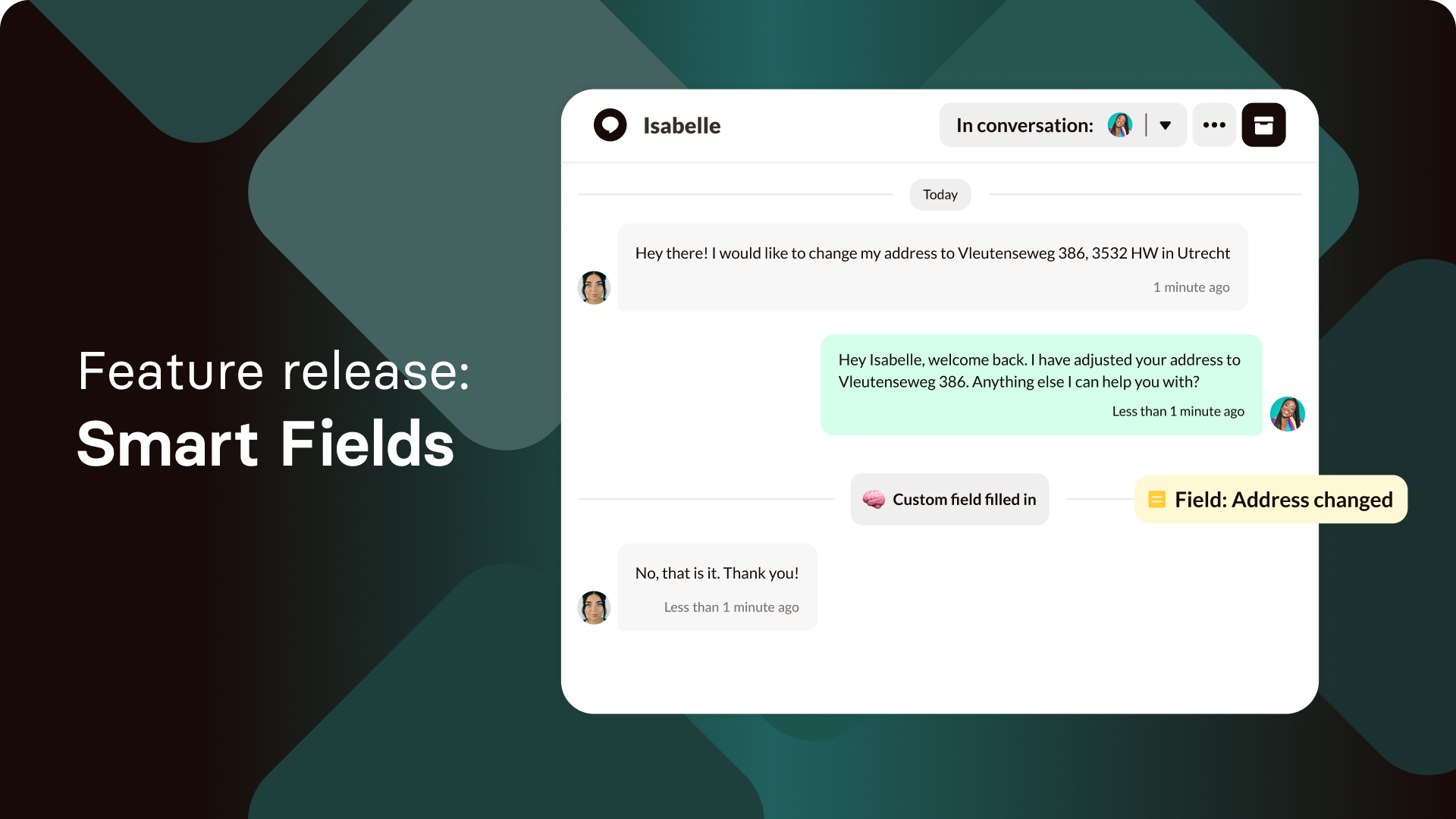
Smart Fields let your AI Agent capture, store, and reuse customer data automatically during conversations.👉 How to use Smart Fields
New features
- AI agent activation check: When turning on the AI Agent, a pop-up now confirms whether the correct channels are connected.
Performance & infrastructure
- Response speed in conversations has been improved, making replies feel faster and smoother.
Navigation & UI enhancements
- Chat widget text formatting (bold, italic, etc.) is now displayed correctly.
- Chat widget text no longer stretches too wide.
- Welcome message in the widget now supports white space and line breaks for better readability.
- Custom fields are now split into separate routes, making navigation easier:
- Default fields
- Custom fields
- Automate fields
Visual improvements
- Fields visibility: default fields (First Seen, Last Seen, etc.) now show correctly in contact cards when enabled.
- Hidden custom fields no longer appear in contact or conversation details when turned off.
Security & compliance
- Chat widget CSP support: Updated the chat widget CSS to follow CSP standards. Customers using CSP rules may need to verify correct rendering.
Bug fixes and reliability
- Fields now fill in automatically as intended.
- Deactivated tags no longer show up or apply in the Inbox.
- Tags are correctly assigned and no longer depend on the first message only.
- Searching for agents now supports capital letters.
- Deleted private apps no longer appear in search or reappear in the list.
- Messages in the chat widget keep their line breaks when returning to the widget.
- Adding a duplicate tag no longer increases the tag count.
- Manually added tags no longer disappear when switching chats.
- Standard fields stay with the correct conversation even when other chats receive replies.
- Custom field values update in real time again.
- Web Crawler now crawls only the selected URLs, not the entire list.
- AI Search works properly with both selected URLs and full-internet search modes.
- Fixed a typo showing “Yesteday” in the Inbox.
New statistics out of beta
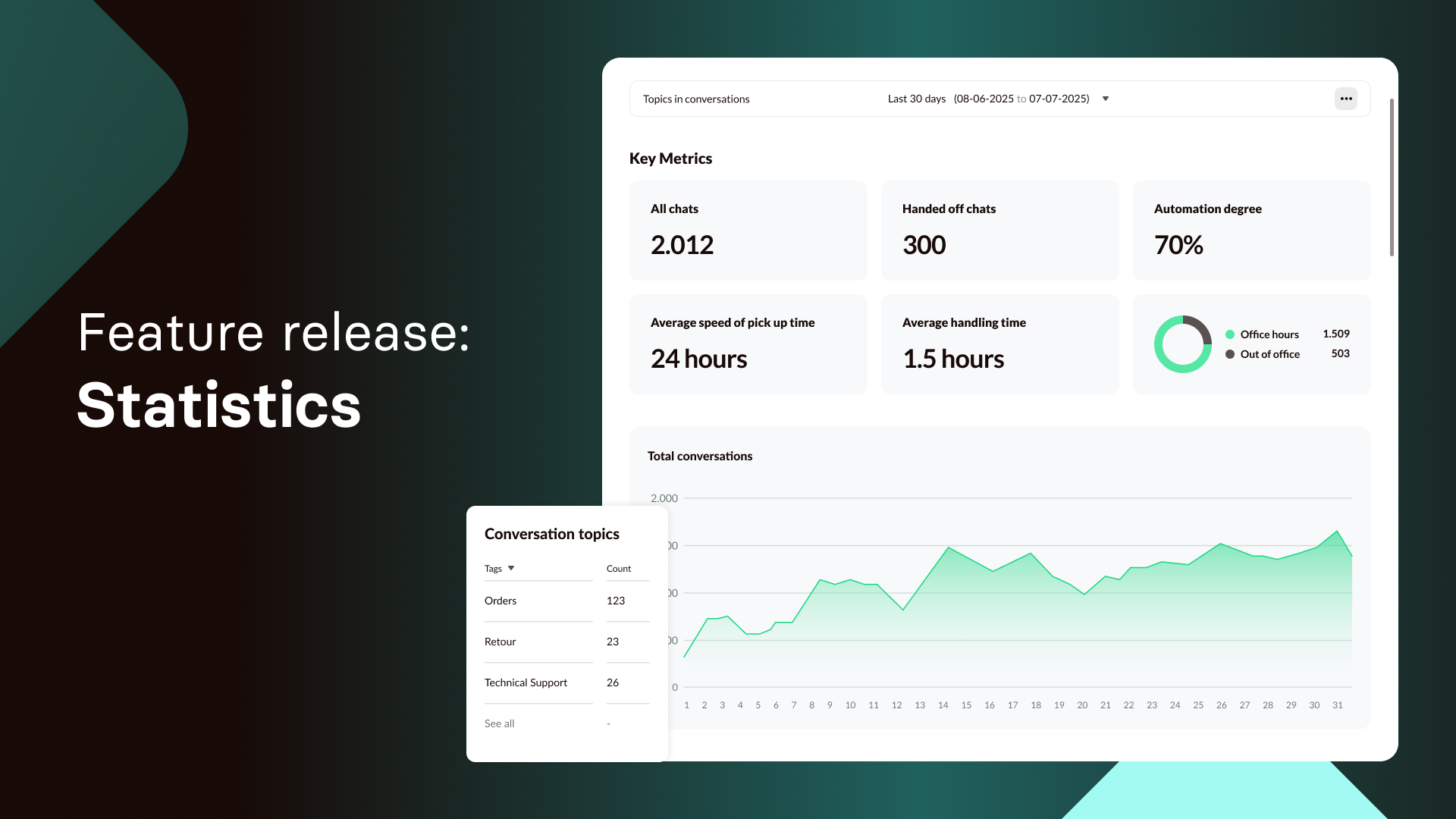
The old statistics page has been replaced with a fully redesigned Statistics module offering richer insights and more flexible reporting options.👉 Learn about the new statistics
New features
- Browser notifications now appear immediately when a conversation is handed over from the Agent to New.
- OpenAI websearch powers AI Search for faster, more reliable results.
- Conversation display issues resolved — conversations now appear instantly when handled by the Agent.
Agent improvements
- Browser notifications now appear immediately when a conversation is handed over from the Agent to New.
- OpenAI websearch powers AI Search for faster, more reliable results.
- Conversation display issues resolved — conversations now appear instantly when handled by the Agent.
Performance & infrastructure
- Real-time messaging improved for more consistent message delivery.
- Automatic tagging reliability improved when multiple conversations start simultaneously.
Navigation & UI enhancements
- Japanese translations added for Document Scraper and AI Search menu, including layout fixes.
- Save button alignment corrected in the instruction category editor.
- User avatar no longer shows a broken image when user details are empty.
- Uploading documents or creating tags no longer changes the avatar in the “Added by” column.
- Chat widget URL previews now only show when a meta image exists.
- Chat widget queue timing improved.
- Sorting in the tags table (name, creator, creation date).
- Custom fields and tag creation restrictions improved for cleaner workflows.
- Inbox links now open in a new tab.
- Interactive Tester scrolling fixed.
- Delete tag pop-up can be closed with ESC.
- Tag creation removed from the conversation page to keep tags consistent.
- “Create tag” link added to the Add tags flow in the Inbox.
- Web crawler loading bar replaced with a spinner.
Analytics changes
- Statistics issues fixed (reports not opening, saving without a name).
- Statistics report export now works correctly.
Visual improvements
- Broken avatar on new users fixed.
- Minor text and UI cleanup for smoother user experience.
Bug fixes and reliability
- Notes always show as plain text, avoiding HTML formatting.
- Queue pop-up no longer stays visible after reassignment or cancellation.
- Yesterday filter shows correct results.
- Crawl button (trial plan) no longer appears disabled after adding URLs.
- New conversations now appear in the Inbox as expected.
- “In chat” and Assignee fields update correctly after handoff.
- Statistics reports open reliably and cannot be saved without a name.
- Several email notification issues fixed (handover, agent messages, assignments, inbox settings).
- Chat widget queue now appears at the correct moment.
- Notifications for “New message” in the New inbox work correctly for handovers.
- Statistics export now downloads a valid .csv file.
- Deleting one automated tag no longer deletes others.
- Saving without a selected tag no longer creates an empty tag.
AI model switch
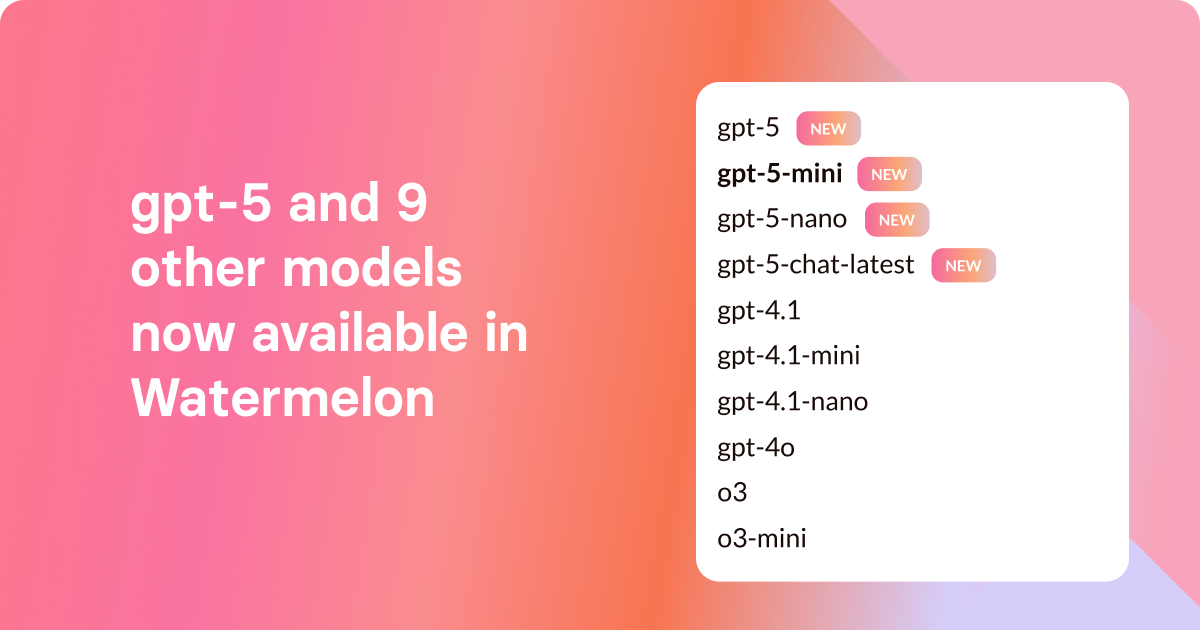
You can now choose from ten AI models — including the new GPT-5 — and switch at any time to match your needs.👉 Learn about the model switch
Automated tags
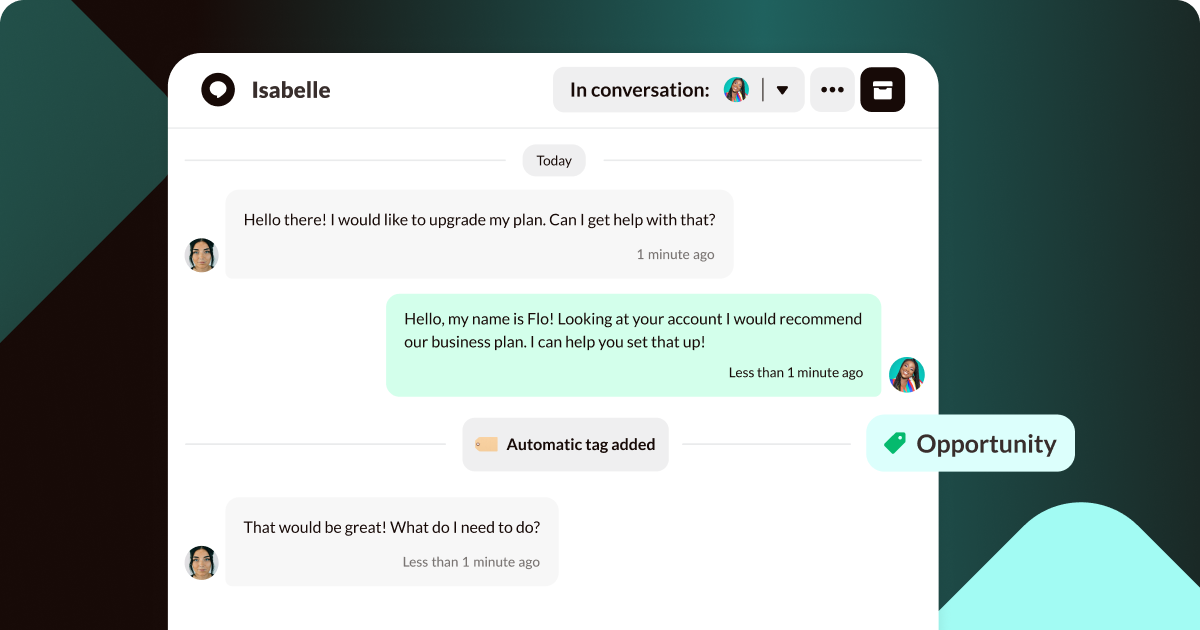
Automated Tags categorize conversations for you. Everything is handled automatically — no manual tagging required.👉 Learn about Automated Tags